DocumentationCustom Server RPC Logo
Custom Server RPC Logo
Configure dynamic Discord Rich Presence server logos for SA-MP and open.mp servers running with Spynixx Launcher.
Overview
Starting in version v1.2.4, Spynixx Launcher dynamically displays custom server logos inside Discord Rich Presence when players are connected to your server.
- Dynamic Custom Server Logo: Replaces the main RPC Large Image while in-game.
- Automatic Fallback: Reverts smoothly to the default Spynixx logo when no custom logo is configured.
- Full Compatibility: Works seamlessly for both SA-MP and open.mp servers.
Logo Comparison
Compare how Discord Rich Presence appears with the default Spynixx launcher branding versus a custom server logo rule:
Default RPC Logo
Enlarge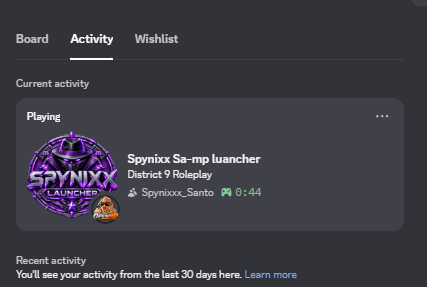
Fallback Spynixx logo when no custom logo is configured.View image ↗
Custom Server Logo
Enlarge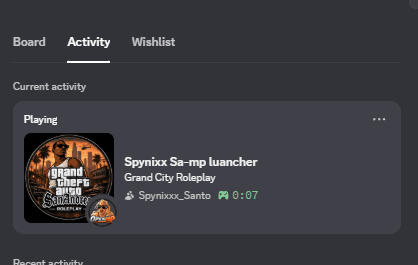
Replaces the default logo in-game with server rule logo.View image ↗
Server Logo Configuration (SA-MP & open.mp)
Add a direct HTTPS image URL using SetServerRule inside OnGameModeInit in your gamemode or filterscript:
gamemodes/myserver.pwn
// Add under OnGameModeInit in your gamemode or filterscript:
public OnGameModeInit()
{
    SetServerRule("logo", "https://i.imgur.com/YOUR_LOGO.png");
    return 1;
}
Once configured, Spynixx Launcher will automatically detect the rule query and display your server logo in Discord Rich Presence without requiring any player downloads or launcher restarts.
Image Guidelines & Best Practices
- Recommended Resolution: 512 × 512 px (1:1 square aspect ratio).
- Format: High-resolution
.pngwith transparency recommended for optimal Discord theme appearance. - Direct HTTPS URL: Must be a direct raw link starting with
https://(e.g.https://i.imgur.com/YOUR_LOGO.png). Do not use webpage gallery links or file-sharing preview pages.